BitcoinTX
Bitcoin taxes, worked out on your own machine.
BitcoinTX keeps a double-entry ledger of every buy, sell and move, matches each sale to the coins it came from, and fills in IRS Form 8949 and Schedule D. It runs on your Mac, your StartOS server or in Docker. No account, no cloud, free and open source.
Tax forms for the United States (IRS). BitcoinTX is software, not tax, legal or financial advice. It works from the records you enter: check its figures with a tax professional before you file.
You paste the exchange email, or enter it yourself
BitcoinTX records it and matches it to the coins it came from
You check it, then file the filled-in form
| (a) Property | (b) Acquired | (c) Sold | (d) Proceeds | (e) Basis | (h) Gain |
|---|---|---|---|---|---|
| 0.05 BTC | 01/10/2023 | 06/20/2025 | 4,838.00 | 850.50 | 3,987.50 |
Carried to Schedule D, line 9.
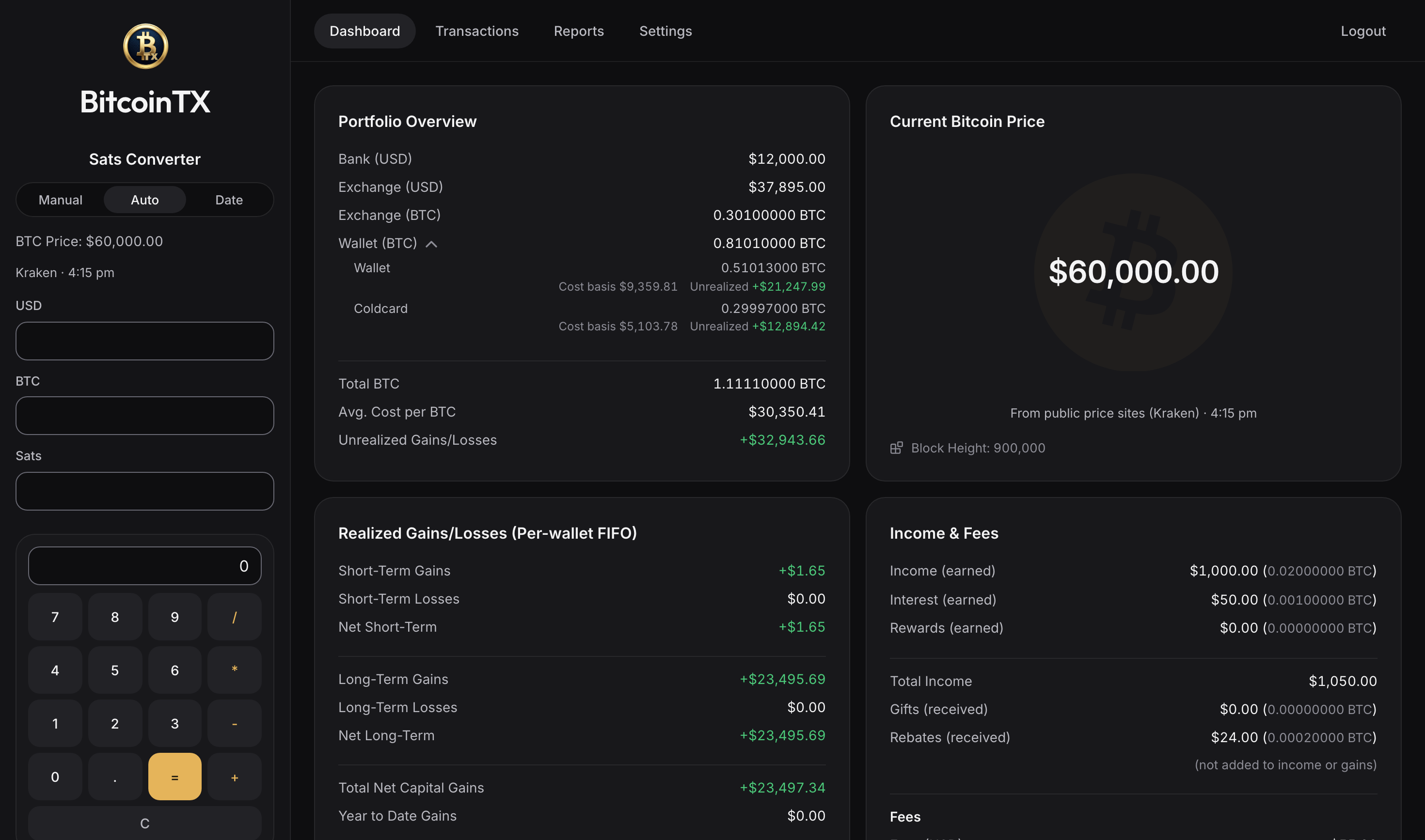
Your whole stack, one screen.
What your banks, exchanges and wallets hold, what your coins cost, what you've gained, and what you earned in bitcoin.
What it does
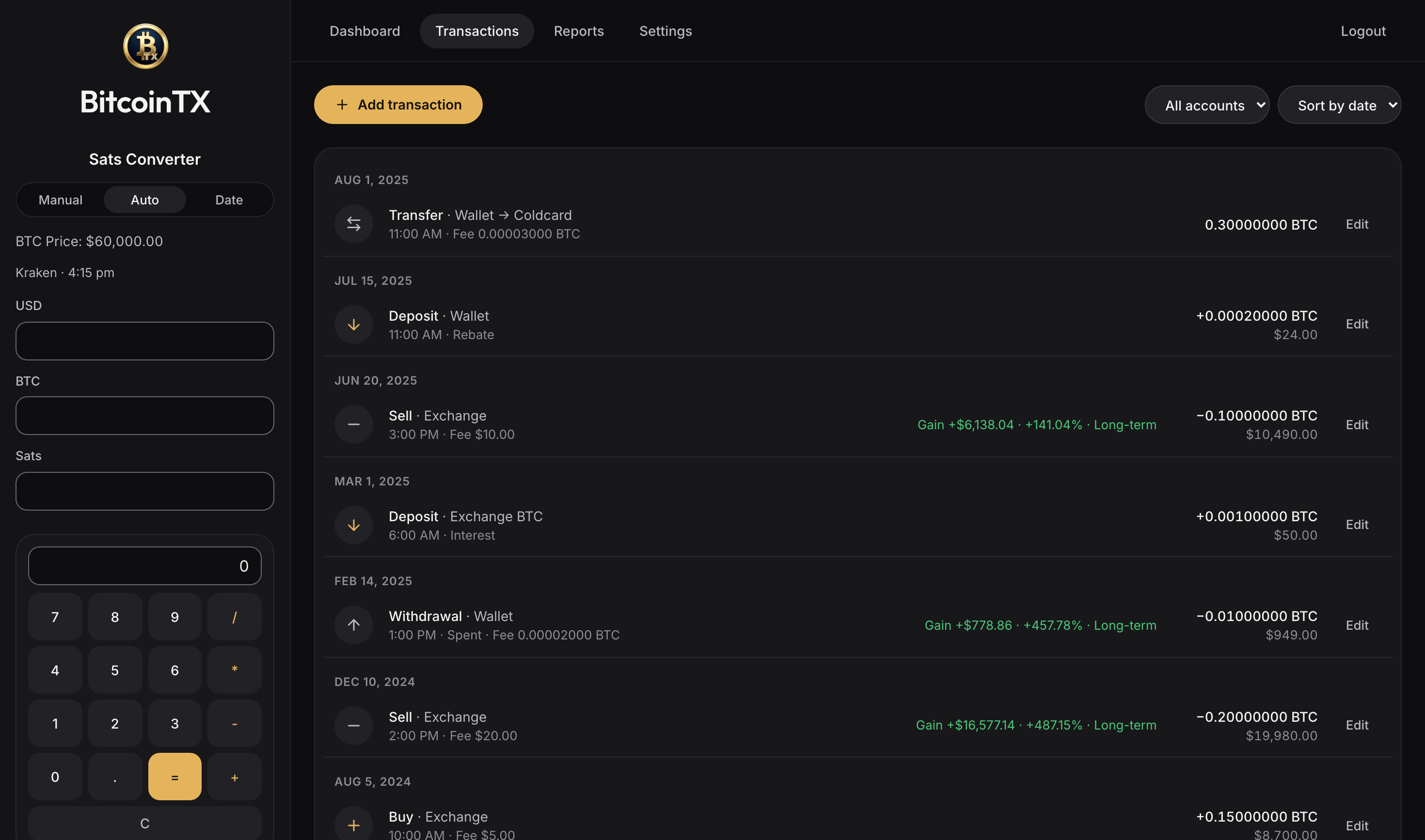
Built for bitcoin only, and for the way bitcoiners actually move coins: buy on an exchange, withdraw to cold storage, spend or sell later.
⚠ Important: add each wallet and exchange. Add each wallet, exchange and bank you use in Settings, under Wallets, exchanges and banks. From 2025, cost basis is figured wallet by wallet and account by account; unless you identify the coins you sell, first in, first out within each, by the date first acquired (Treas. Reg. §1.1012-1(j)). Cost basis is per-wallet FIFO: each wallet and exchange uses its own oldest coins first for a sale, spend or transfer, unless you choose other coins in one of your own wallets. If you kept multiple wallets or exchanges together in BitcoinTX 1.x, years before you added them were figured together: ask a tax professional whether an earlier return needs a change.
RecordEnter what happened once; the ledger works out the rest.
Your wallets, exchanges and banks
Add each one you use, by the name you know it by, and rename or hide it whenever you like. Each wallet and each exchange keeps its own coins.
Five kinds of transaction
Deposit, withdrawal, transfer, buy and sell, by your accounts' names. Every one is a balanced double entry.
Per-wallet FIFO
Each wallet and exchange uses its own oldest coins first for a sale, spend or transfer, unless you choose other coins in one of your own wallets. A transfer between your accounts keeps each lot's purchase date and cost, so the holding clock and the basis travel with them. Coins you already owned, or received as a gift, can keep the date they were first acquired. Inherited bitcoin takes its value on the date of death and is always long-term.
Choose which coins leave a wallet
In one of your own wallets you can choose, purchase by purchase, which coins leave, if you chose them by the time they left and your records from then show which purchases they were. Otherwise the oldest count as leaving first. A tax professional can tell you whether your records are enough. An exchange's coins leave oldest first: BitcoinTX doesn't record a choice made at an exchange.
Network fees handled
The on-chain fee of a transfer or withdrawal is recorded as its own small disposal, valued at the price when its hour began. A spend's fee also comes off what the spend brought, and a consolidation within a wallet records just its fee.
Backdate freely
Every edit or deletion, and every entry dated before your latest one, recalculates the whole ledger in date order, so a forgotten purchase from two years ago lands in the right place.
Earlier tax years ask first
A save that would change the figures of a tax year before this one, which you may already have filed, shows which years and what changes, and saves only when you say so, with a copy made first.
Imports
An exchange's own CSV export into a ledger in use, ready-made for River, Coinbase, Kraken, Strike, Swan and Cash App, or any other once you match its columns; the preview leaves out what's already recorded. All but River's follow the exchange's published format and haven't yet been checked against a real export, so check the preview against your file. BitcoinTX's own CSV to start a new ledger, or an AI assistant that turns emails and wallet histories into entries.
Income at its real value
Bitcoin earned as pay, interest, mining, staking or bonuses is valued at the price when its hour began, which is both its cost basis and the income you report. Sats-back for spending is valued the same way, as a rebate, not income.
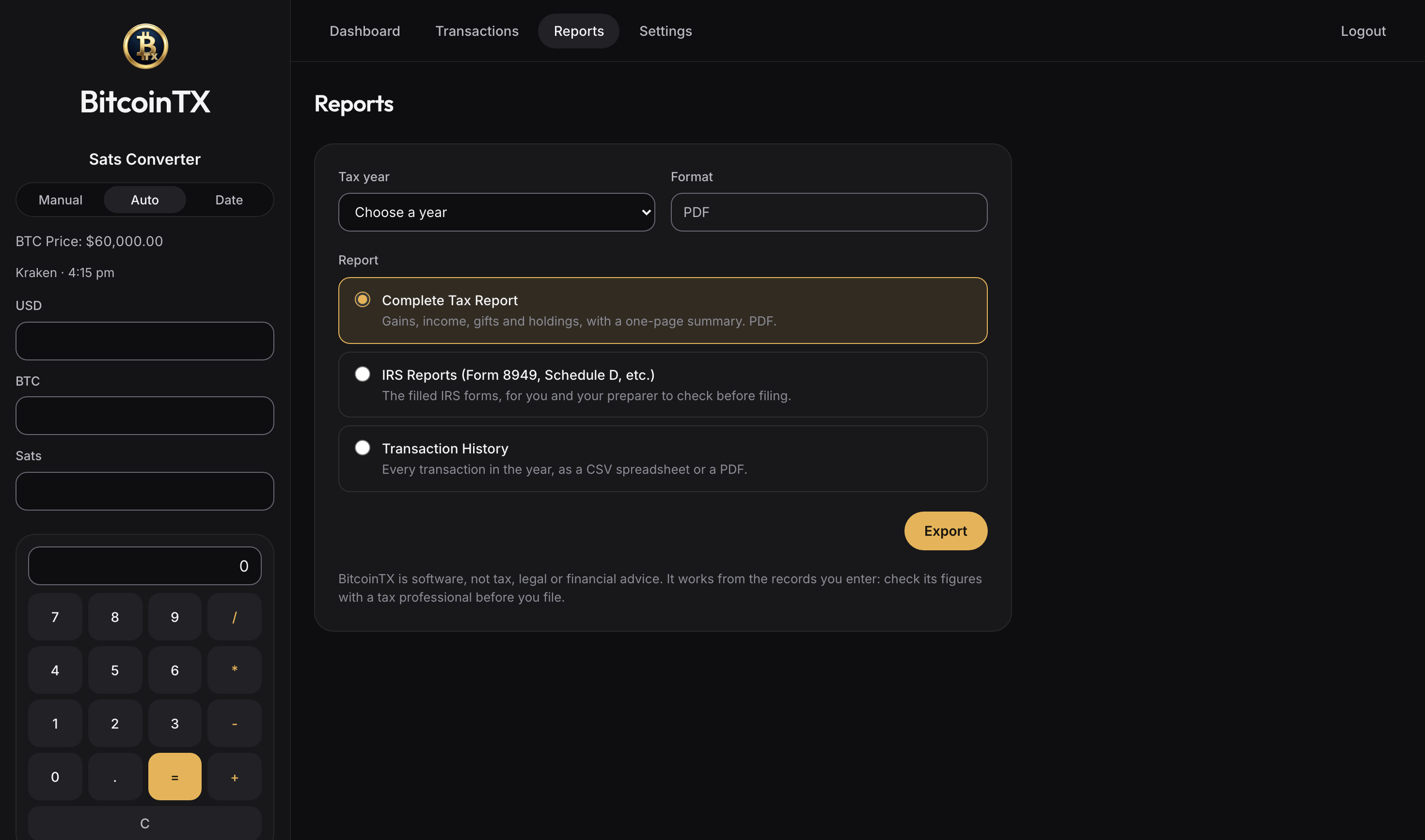
FileThe official forms, filled in, for you and your preparer to check and file.
Form 8949 and Schedule D
The official IRS PDFs, filled in and flattened, one sheet per box, with totals carried to the right Schedule D lines. Until the IRS publishes next year's final forms, a preview on its drafts, marked DRAFT — DO NOT FILE.
Form 1099-DA, exchange by exchange
From tax year 2025, an exchange's sales go in the boxes for a Form 1099-DA. An exchange you mark as sending none goes in the boxes for no broker form. If your broker's form says something different for a sale, record that on the sale and the box follows.
Complete tax report
One PDF for you or your preparer: the year's key figures on the cover, a one-page summary with each Form 8949 box, its Schedule D line and the answer to Form 1040's digital asset question, then every sale, income, gift and holding, naming the account of each disposal and lot, with rebates in a table of their own and the coins you chose. “Sales by exchange” adds up each exchange's sales to set beside its 1099-DA. A “Using these forms” page tells your preparer what's filled in on the forms, what's left blank, and why. Your transaction history comes as a spreadsheet or a PDF.
Your tax timezone
Decides which year a late-night December 31 sale belongs to, the dates on the forms, and the day a holding turns long-term: after one full year, as the IRS counts it.
CheckSee what's off before it reaches a form.
Ledger review
A read-only list of entries worth a second look, each with its accounts: a spend saved at $0, a buy or deposit with no cost basis, an income, rebate, gift or donation with no value, values priced at the day's price that the hour would change, and every figure a recalculation would change; then, as reminders, My BTC and Gift deposits without their original date, and exchange sales your Form 1099-DA may show differently.
Hourly price history
Hourly prices from 2013 are kept on your machine, from one download checked against fingerprints that come with BitcoinTX, when you allow public price sites. Nothing is ever valued at today's price or at $0 by accident: with no price, BitcoinTX asks you to type it.
Encrypted backups
Download the whole database as a password-protected backup and restore it on an install of the same version or newer; 2.0 restores a 1.x backup too, and 1.x refuses a 2.0 backup. An update, a restore, a confirmed change to an earlier tax year, Delete All and an AI's changes each keep a copy of the database first.
Keep privateYour financial history is nobody else's business.
Runs where you are
On your Mac, your StartOS server or your own Docker host, behind your own login. There's no BitcoinTX account and no server of ours.
Your own node for prices
Ask your own Mempool for newer prices, or public price sites, or nobody. Nothing is contacted until you choose. On StartOS, one action connects the Mempool on the same server, and public sites can go over Tor.
Lookups that don't give away your dates
The hourly history comes in one download that's the same for every install, then only the newest hours in fixed blocks, so no request names one of your dates. One price per hour won't always match a chart of one exchange at another moment. A VPN or Tor hides your IP address too. Through Tor, Bitstamp refuses the history download, so BitcoinTX asks once before fetching just that download without Tor: Bitstamp then sees your address, still none of your dates, and the live price stays on Tor.
Nothing phones home
No analytics, no trackers, fonts shipped with the app. The database and backups are readable by you alone.
Or just describe it to an AI.
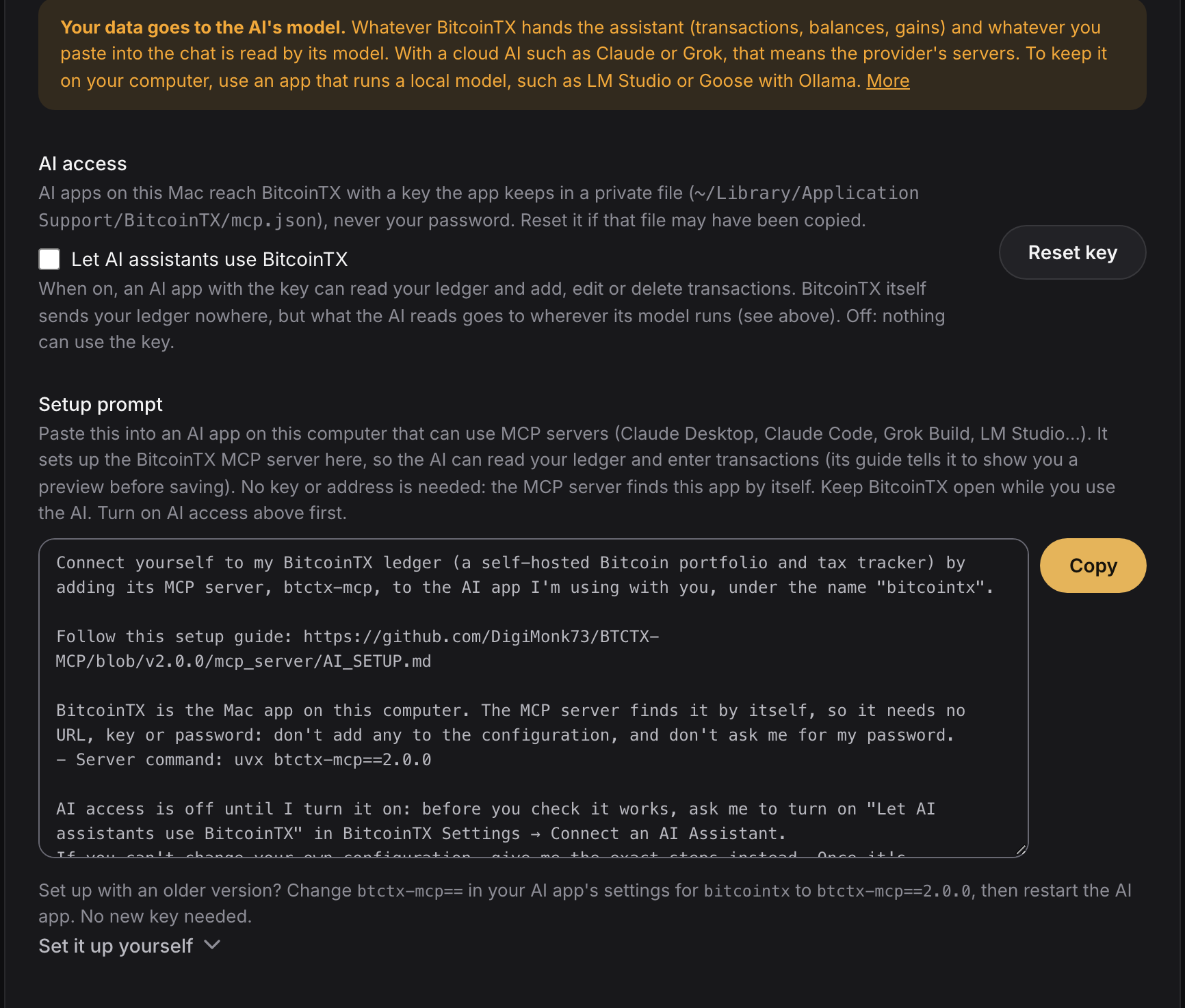
Optional, and off until you turn it on. Make AI your bookkeeping assistant: paste an exchange email or a wallet's history, or just say what happened, and it enters the transactions and answers questions about your ledger, naming your accounts as you named them and asking which one when more than one fits. Use any AI app that supports MCP: a cloud assistant, or a model you run yourself for full privacy.
- Here's my exchange email: "You bought 0.00231 BTC for $150.00 (fee $1.49) on Mar 3"
- I moved everything from Kraken to my Coldcard on March 10, network fee 1,800 sats
- Got paid 250k sats for a logo design on May 2, straight to cold storage
Pick the model with care. The AI's model reads what BitcoinTX hands it and whatever you paste. With a cloud AI such as Claude or Grok, that goes to the provider. To keep it on your computer, use an app that runs a local model, such as LM Studio or Goose with Ollama.
- Works with Claude Desktop, Claude Code, Grok Build, LM Studio, Goose and other MCP apps.
- Settings has a setup prompt: paste it into your AI app and it sets itself up.
- AI access is off until you turn it on, and the AI uses a key you can revoke, never your password. The key can read your ledger and add, edit or delete transactions; it can't log in, restore a backup or delete everything.
- The connector (btctx-mcp on PyPI) is pinned to your BitcoinTX version, so nothing new is fetched behind your back.
Download
Every download below is the latest release. What changed: release notes.
BitcoinTX 2.0 is the current version, with multiple wallets, exchanges and bank accounts. BitcoinTX 1.x gets no more fixes; its last release, 1.2.10, stays downloadable.
Mac
A normal Mac app, for Macs with Apple silicon (M1 or later). Your data stays in your user folder.
- Open the .dmg and drag BitcoinTX to Applications.
- The app isn't signed by Apple yet. The first time, Control-click it and choose Open. On macOS 15 or later, open it once, then go to System Settings, Privacy & Security, and click Open Anyway.
StartOS
For a Start9 server with StartOS 0.4.0.2 or later: runs next to your node, reachable from your devices.
- Start9 publishes each release first to its Community Beta registry, then, once tested there, to its Community Registry, which can be a version behind. In StartOS, open Marketplace, click Switch and choose Community Registry (
https://community-registry.start9.com); to get each release as soon as it's out, addhttps://community-beta-registry.start9.cominstead (Start9's guide). StartOS 0.4.1 and later block what only Community Beta's build key has signed: to install from there, turn on Start9 Alpha for service packages under System > Trusted keyrings (Start9's guide). Then choose BitcoinTX and click Install. New versions show in the Updates tab. - Or sideload it: download btctx.s9pk above and upload it under Sideload. StartOS 0.4.1 and later ask “Install untrusted software?”, because the file is signed with BitcoinTX's own key, not one your server trusts: check the file, then choose Install anyway.
- Run Set Login Credentials (it shows your login once: keep it), then Price Source & Privacy: your own Mempool, public price sites (optionally through Tor), Nobody, or decide in BitcoinTX.
- Start the service and open its Web UI.
- Package source: Start9-Community/BTCTX-StartOS.
Docker
Linux, Windows or Mac; amd64 and arm64.
docker run -d -p 127.0.0.1:8080:80 -v btctx-data:/data ghcr.io/digimonk73/btctx-mcp:latest
- Open http://localhost:8080. It's reachable from this computer only: for other devices, put it behind HTTPS (a reverse proxy such as Caddy).
- Your data lives in the btctx-data volume. :latest follows each release: pin a version with :vX.Y.Z (:v1.2.10 stays on 1.x).
- BitcoinTX runs in the container as its own user, never as root.
First run
A new Mac or Docker install starts with the login admin / password, and the first screen has you set your own before anything else. The Mac app's window fills in its one-time setup code; Docker asks you for it, shown by docker logs and saved as setup-code.txt in /data. On StartOS, Set Login Credentials creates your login and shows it once. Then choose where prices come from (your own Mempool, public price sites, or Nobody) and add each wallet, exchange and bank you use in Settings.
Upgrading
Download an encrypted backup first. Then install the new version over the old one: it upgrades your database by itself and keeps a copy of the old one. Open Settings, Ledger Review: it lists every figure a recalculation would change, and you run Recalculate Ledger when you agree. If you use the AI connector, change btctx-mcp== to the new version in your AI app's settings and restart the AI app.
From 1.x to 2.0
Before you update, download BitcoinTX's backup; on StartOS also make a StartOS backup and keep it, since it's your way back: a later backup to the same drive replaces it, so back 2.0 up to another drive. Docker's :latest moves to 2.0 with no prompt, so back up before you pull it. Every transaction keeps its account. Coming from 1.2.10, your tax figures don't change, except in a ledger started before 0.9.2 (Ledger Review lists those rows). From an older 1.x, that version's fixes apply too: start with 1.2.10's notes. BitcoinTX keeps a copy of your 1.x database, so its data takes about twice the space. Then add your other wallets, exchanges and banks, set each exchange's Form 1099-DA switch, move coins into each with a Transfer dated when they really moved, and update the AI connector. What you enter in 2.0 can't go back to 1.x: the README has the steps and the way back.
From source
Python 3.11+ and Node.js 22.13+. Instructions in the README.
Support BitcoinTX
BitcoinTX is free and always will be. If it saves you time at tax season, you can send a few sats over Lightning, from any Lightning wallet, or through the tipping page.